Free tool / booking system tester
Can a customer actually complete a booking today?
Booking widgets are usually someone else’s software living inside your website. They break on their own schedule, without taking your site down and without telling you. Here is how to check yours.
Give us your booking page and we email you a free report. No account, no card, and no booking is ever made.
Free check One page
Check my booking page.
Enter the page customers book from. Pulse opens it like a customer would, checks the booking buttons and widget, and follows it into your booking system (Fresha, Calendly, Acuity and the like) without ever making a booking.
We look at that one page and the tools it links to, like a customer would, and never send forms or make bookings. One free check of each kind per website each week. Privacy policy.
[ The empty diary ]
Why booking systems fail while the website stays up
Almost every online booking journey is an embedded application: Amelia, Calendly, OpenTable, ResDiary, Fresha, Treatwell, SimplyBook, Bookeo, Squarespace Scheduling, Setmore or one of a hundred others. It loads inside your page but it is not your page. It has its own servers, its own JavaScript and its own failures.
This is why a booking failure is so hard to notice. Your hosting company sees a healthy website. Your uptime monitor sees an HTTP 200. Your website looks exactly as it should. Meanwhile the calendar is empty, the service list never loads, or the Book now button opens a widget that spins forever, and every customer who tried has already booked somewhere else.
Failure modes What actually goes wrong
The ways it breaks
without telling you.
01
The widget never loads
The container appears, the spinner starts, and nothing follows. Usually the third-party script failed, was blocked, or the embed code was invalidated by a plugin update. Your page still returns a perfectly healthy response code.
02
No dates or times are available
Availability rules, staff rotas or a lapsed calendar sync can leave every date greyed out. The system is working exactly as configured; it has simply been configured into showing customers nothing.
03
Caching serves a stale version
A caching plugin or CDN can serve visitors an older copy of the booking page whose scripts no longer match the live booking service. The owner, logged in and bypassing cache, sees a working widget. Nobody else does.
04
It breaks only on mobile
Most bookings are made on phones. A widget that is unusable on a small screen (a calendar that will not scroll, a button pushed off-screen) fails for the majority of customers while looking fine on your desktop.
05
The journey fails partway through
Choosing a service works, choosing a date works, then the confirmation step errors. Partial journeys are the worst kind, because the customer has invested effort and leaves with a distinctly bad impression.
06
The subscription or integration lapsed
Booking platforms suspend accounts on a failed payment, and payment or calendar integrations expire their tokens. The widget then loads and politely refuses to take bookings.
The test Five minutes, done properly
Check it yourself,
the way a customer would.
01
Open the booking page on a phone, in a private window
Not your desktop, and not logged in. Most bookings happen on mobile, and being logged in bypasses exactly the caching layer that causes stale-widget failures.
02
Wait for the widget to fully load
Give it fifteen seconds. A widget that eventually appears after a long delay is still a failure: most customers will have left well before then.
03
Choose a service, staff member or table
Work through every selection a real customer would make. Selectors that do not respond, or lists that are empty, are the most common single fault.
04
Check that real dates and times appear
Look several weeks ahead. An availability rule that has quietly expired often shows this week as bookable and nothing beyond it.
05
Go as far as the final confirmation, then stop
Advance to the last step before payment or confirmation so you exercise the whole journey without taking a real slot out of your own diary.
06
Try one alternative route
If customers can book by service and by staff member, or for a table and a private event, test both. They frequently use different code paths and fail independently.
If it failed
If the booking journey failed, the problem is usually not your website.
Start with the booking provider: log in directly and confirm the account is active, the subscription is paid and availability is published for the weeks ahead. Then clear your website’s cache and any CDN cache, and test again in a private window. If the widget still does not load, re-copy the embed code from the provider: plugin and theme updates regularly strip the attributes it depends on.
Why Pulse exists
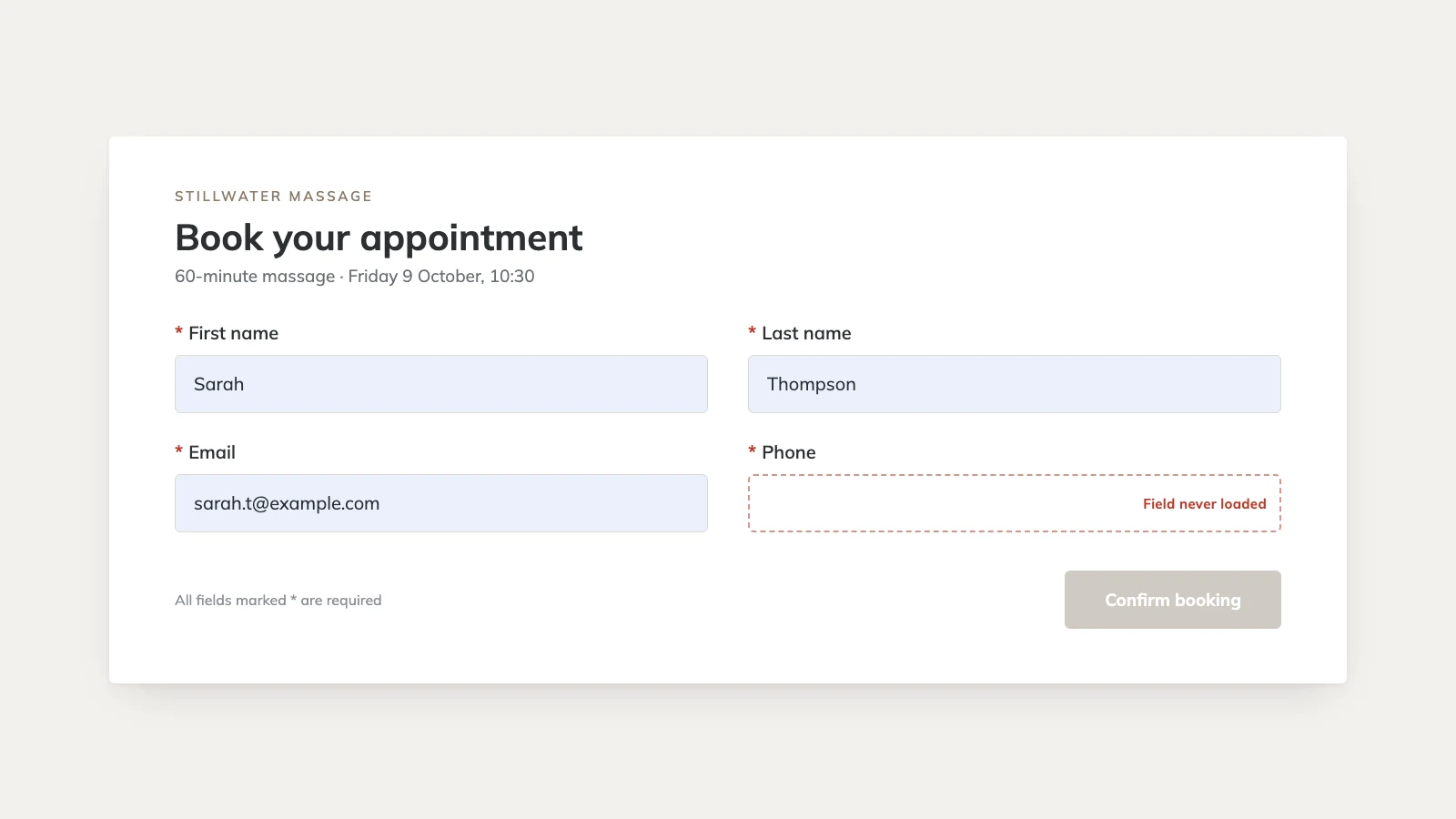
A recreation of the booking form that started Pulse: the phone number field never loaded, so nobody could finish booking. The website itself was up the whole time.
Check it automatically No card required
Rather not remember
to check?
Pulse can watch the journey for you on a schedule and tell you the moment it stops working, with a screenshot of what a customer would have seen. Start with one website free.
Give us your booking page and we email you a free report. No account, no card, and no booking is ever made.
Useful answers Without the jargon
Questions about
booking system tester.
Why does my booking system work for me but not for customers?[+]
Because you are almost certainly logged in, on a desktop, on a network you use every day, with your own caching bypassed. Customers arrive with none of those advantages. Testing in a private window on a phone removes most of the difference.
My uptime monitor says the site is fine. Why did bookings stop?[+]
An uptime monitor asks your server for the booking page and checks that it answers. It does not run the JavaScript, so it never sees the widget, the calendar or the availability. The page can be perfectly healthy while the booking application inside it is not.
How often should I test my booking journey?[+]
Weekly is sensible for a business that depends on bookings, and always after a website update, a plugin update or any change at the booking provider. It takes five minutes; a lost weekend of bookings does not.
Can Pulse check my booking widget automatically?[+]
Yes. Pulse opens your booking page in a real browser on a schedule, follows the route you agree with us (choosing a service, opening the calendar, checking dates appear) and alerts you with a screenshot when a customer would get stuck. It stops before confirming, so it never takes a real slot.
Does Pulse make test bookings?[+]
Not on the current Browser plan, deliberately: it will not fill your diary with fake appointments or hold tables. Controlled test bookings with automatic cleanup are planned for the Transaction tier, and would only ever run on a workflow agreed with you first.
Which booking systems does this work with?[+]
Any booking journey that a customer can complete in a standard browser, including Amelia, Calendly, OpenTable, ResDiary, Fresha, Treatwell, SimplyBook, Bookeo, Setmore and Squarespace Scheduling. Pulse checks the guest-facing journey on your website rather than connecting to the provider’s system.