Pulse for agencies Quietly ahead of the email
Website QA and monitoring for agencies.
Automated website QA for every client site, then proactive monitoring as a visible part of your care plan, without adding another complicated platform to your week.
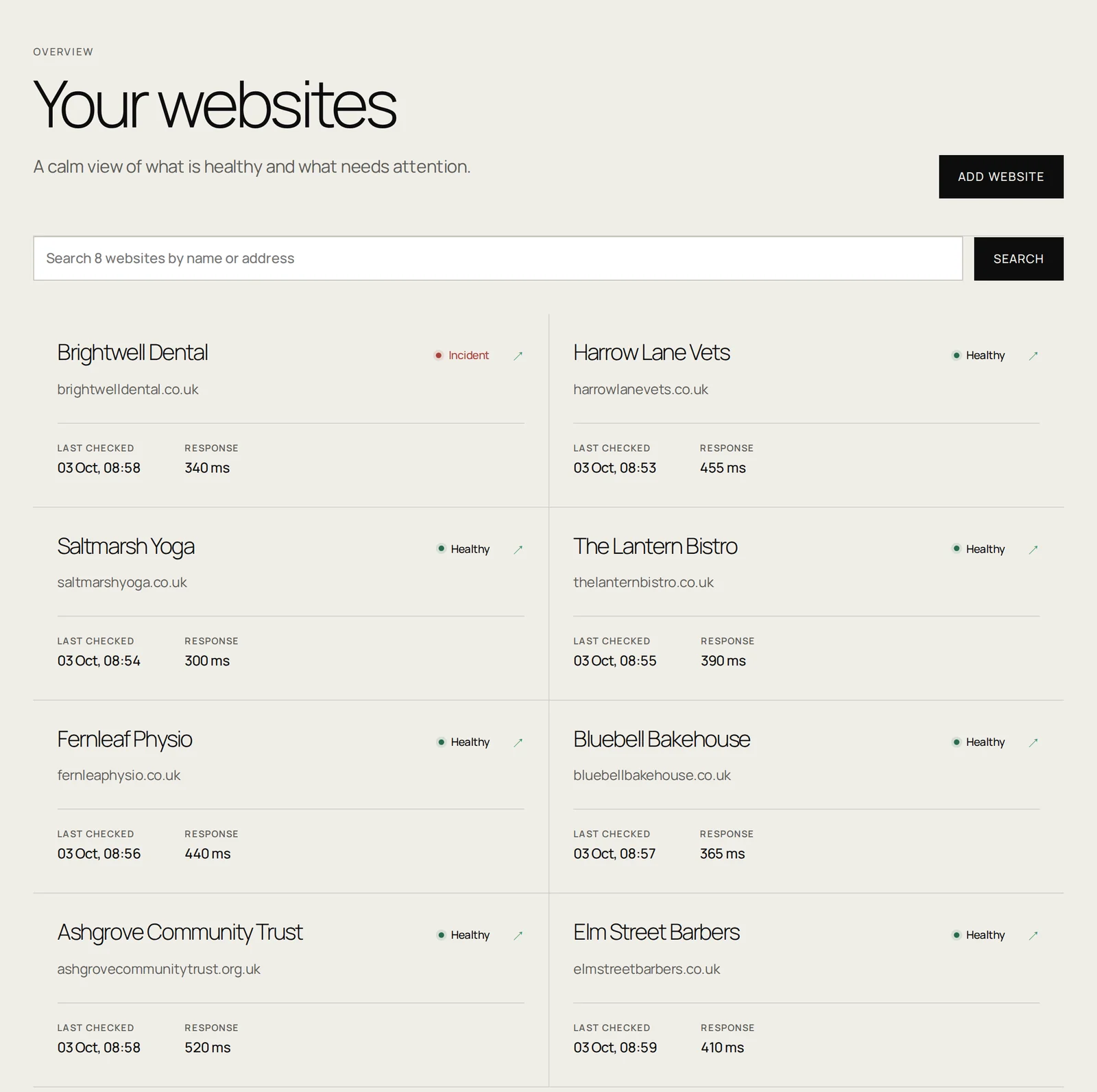
Client estate overview
Your client websites and their monitoring status, together in one view.
[ the familiar sequence ]
09:06
“Quick question: has anything changed on the booking page?”
09:08
Check the website. Reproduce it. Find the right person.
08:42
Pulse noticed first.
One estate Clear signals
A better maintenance
conversation.
01
See the client estate
Keep commercially important websites and journeys visible in one calm view.
02
Receive useful evidence
Failure snapshots and journey results give your team somewhere concrete to begin.
03
Share the health
Give clients a clear monitoring view without handing over administrative access.
04
Verify the recovery
Once the fault is fixed, Pulse checks the customer experience again automatically.
[ browser journeys ]
Client journeys, watched
without the upkeep.
On the websites you look after, the risk is rarely the homepage. It is the booking widget, the inquiry form or the checkout failing quietly between your monthly checks, until the client calls you about it.
Pulse looks at each client website, works out which routes earn that business money and builds the browser journeys around them. Bringing a portfolio on does not mean a week of configuration, and the tenth website is no more work than the first.
When a client redesigns a page, the journeys adjust themselves instead of filling your inbox. When something genuinely breaks, you receive a screenshot of the failing step and a short explanation you can forward to whoever puts it right.
Automated website QA for every client site
Before a launch, after a redesign or when a new client comes on board, Pulse audits the whole website the way your pickiest customer would. It opens the pages, follows the links, presses the buttons and tries the booking, contact and checkout routes up to the final step, without ever sending a form or placing an order.
What the QA audit reports
- Broken links and missing pages, including “get a quote” and “book now” links that lead nowhere.
- Forms that won’t send: fields that refuse a normal answer, and send buttons that are covered or greyed out.
- Booking widgets, embeds and scripts that fail to load.
- Slow pages, insecure forms and phone links that dial the wrong number.
Each audit ends in a plain-English report with a score and the evidence behind every finding, plus a PDF with your agency’s name on it, ready to send to the client. Anything you mark as not a problem leaves the report.
At portfolio scale Built for many websites
Add the next client
without the setup.
01
Onboarding stays short
Point Pulse at a client website and the journeys worth running are worked out for you. Growing the portfolio does not grow the configuration work.
02
Real browsers, every platform
Journeys run in a genuine browser on desktop, Android and iPhone screen sizes, so a checkout that only breaks on a phone is still caught.
03
Nothing to maintain
Journeys are self-healing. A client’s redesign updates the checks rather than creating a support ticket for your team.
04
Evidence you can forward
A failure arrives with a screenshot of the step that stopped, the error behind it and the failed requests around it: enough for your developer to begin.
05
Client analytics stay clean
Journeys block recognized tracking and advertising calls and identify themselves as synthetic traffic, so client reporting is not inflated by monitoring.
06
Confirmed before it reaches you
A failure has to repeat three times, and the recorded evidence has to agree, before an alert is sent. You are told about faults, not blips.
Flexible by design Your service, supported
Use Pulse directly.
Or make it part of your care plan.
Agencies receive reduced per-site pricing based on the number of websites they bring onto Pulse. Start with the sites where a broken booking, cart or inquiry path has an immediate commercial cost.
- Volume-based per-site pricing
- Shareable client results
- Human help configuring journeys
- No need for clients to learn monitoring tools
Built for agencies that look after small business websites
Pulse suits web design agencies, WordPress care-plan providers and freelancers whose clients depend on their websites for bookings and inquiries: salons, clinics, trades, studios and local shops. These are the clients who notice a broken booking form first: usually by phoning you.
How agencies use Pulse
- Onboard a care-plan client by agreeing the one or two journeys that pay the bills: booking, inquiry or checkout.
- Catch problems after updates. Plugin, theme and WordPress updates are when booking and contact forms quietly break.
- Report with evidence. Share clear results with clients instead of a generic “all green” uptime report.
- Start where it matters. Begin with the sites where a broken journey costs the client money, then add more at volume per-site pricing.
Make monitoring part of a clear care plan
Use the check history and available failure evidence to give the person responsible for repairs a useful starting point. Agree which client websites and journeys to cover, who receives notifications and what clients can see in shared results.
- Monitoring detects the configured failure; your team remains responsible for repairs.
- Share only the results appropriate for each client.
- Volume pricing, exact allowances and schedule are confirmed before setup.
Portfolio onboarding Built for a hundred sites, not one
Bring the whole client list
in one go.
01
Paste in the whole list
Add every client website at once, pasted in or uploaded as a CSV. There is no per-site wizard to click through and no minimum commitment while you are still deciding which sites are worth watching.
02
We work out what matters on each one
Each website is examined to find the pages and customer journeys that carry commercial weight (the booking widget, the inquiry form, the route to checkout) rather than asking you to specify them site by site.
03
The checks are built and tested for you
Our team builds and tests each journey before it goes live, so the first thing you hear about a check is not a false alarm. Sites are brought online in a paced sequence rather than all at once.
04
You get one email when it is running
No per-site confirmations. One message telling you the portfolio is live, after which Pulse keeps the checks running and tells you when something needs attention.
The care plan maths A line clients understand
The cheapest part of the plan.
The easiest to justify.
Care plans are hard to sell because most of the work is invisible. Updates applied, backups taken, nothing went wrong: a client reads that as paying for nothing. Monitoring is the opposite: it produces a dated record of the times their booking form broke and you fixed it before they noticed.
Per-site monitoring sits well below what a care plan bills each month, and volume pricing brings it down further as the portfolio grows. It is the line item that makes the rest of the plan defensible at renewal.
Agency monitoring: volume-based per-site pricing. Tell us which client websites and journeys matter; we agree scope, schedule and price before setup.
What the client sees
Evidence you can forward
without handing over the keys.
When a journey fails you get the page, the failing step and a screenshot of what the customer would have seen. That is forwardable: it explains the problem to a client without a technical conversation, and it demonstrates that you found it rather than them.
Clients can be given a view of their own website’s health without an account on your systems, administrative access, or the ability to change anything. Nobody has to learn a monitoring tool to benefit from one.
Free tools Check it yourself
Test it now,
before you decide anything.
01
Contact form tester
Find out whether your contact form still reaches a human being, and what to check when it does not.
02
Booking system tester
Find out whether a customer could complete a booking on your website today, and where the journey breaks.
Useful answers Without the jargon
Questions from
agencies.
How many client websites can I bring onto Pulse?[+]
There is no practical ceiling. Portfolio onboarding is built for agencies arriving with a hundred or more websites at once, and sites are brought online in a paced sequence so nothing is overwhelmed, including you.
Do my clients need their own Pulse accounts?[+]
No. The websites sit in your account, you receive the alerts, and clients can be shown their own website’s health without an account or administrative access.
Can I white-label the monitoring?[+]
Monitoring results are designed to be shared with clients as evidence you present, rather than as another vendor they have to deal with. Tell us how you want it to appear to them and we will work with that.
What does agency pricing look like?[+]
Per-site pricing reduces with the number of websites you bring on. There is no per-seat charge and no platform fee. Tell us the size of the portfolio and which journeys matter, and we will agree scope and price before anything is set up.
Do I have to configure the journeys myself?[+]
No, and this is the point. Hand over the list of websites; our team builds and tests the journeys for each one. You are not writing selectors or learning browser automation.
What happens when a client site changes?[+]
Journeys are checked on a schedule and re-verified after a failure. When a redesign or plugin change alters a monitored journey, we adjust the checks rather than leaving you with an alert that cries wolf.
Can I start with just a few sites?[+]
Yes. Most agencies start with the handful where a broken booking, cart or inquiry path has an obvious commercial cost, then add the rest once they can see it working.
Managing multiple client websites?