Uptime monitoring / the essential first layer
Website uptime monitoring with SSL and domain checks.
Simple, regular website uptime monitoring (alongside SSL, domain and content checks) translated into clear information for the people running the business.
[ The first question ]
Is the website online?
Uptime monitoring repeatedly requests important website pages and records whether they respond as expected. Scheduled checks can reveal server outages, broken routes and unexpected HTTP responses without waiting for a customer to report them.
Pulse adds a little more context to that essential check. It can look for content that should be present, watch certificate and domain health, preserve returned HTML when something goes wrong and notify the person who needs to know.
Pulse Monitor. Notice. Rectify.
What Pulse
can check.
01
Important URLs
Monitor the pages that matter instead of assuming one healthy homepage means the entire website is available.
02
Expected responses
Detect unavailable pages and unexpected server responses through regular automated checks.
03
SSL and domain health
See certificate problems and approaching certificate or domain expiry in your scan results, 30 days before they interrupt access.
04
Failure evidence
Keep the returned HTML from a failure so intermittent problems leave something useful behind.
Three layers One clearer answer
Begin simply.
Go deeper where it matters.
01 / monitor
Is it online?
Website availability, SSL, domain and expected content.
02 / test
Does it work?
Real-browser interaction with the customer-facing journey.
03 / verify
Did it succeed?
Controlled transaction and downstream confirmation. Coming soon.
The distinction
Uptime tells you the front door exists.
For many brochure websites, that may be the right level of protection. When the website contains a booking widget, form, basket or other interactive journey, browser monitoring can continue through the door.
Useful answers Without the jargon
Questions about
uptime monitoring.
What does website uptime mean?[+]
Uptime describes the period in which a website or page is available and responds to requests. It does not necessarily prove that every interactive feature works.
Does an HTTP 200 response mean the website works?[+]
It means the server successfully returned something. The returned page can still be incomplete, contain an error message or include broken JavaScript functionality.
Does Pulse monitor SSL certificates?[+]
Yes. Essential monitoring includes SSL certificate health alongside domain and page checks.
Can I share uptime results with a client?[+]
Yes. Shareable monitoring results are designed to help agencies and stakeholders see website health without receiving administrative access.
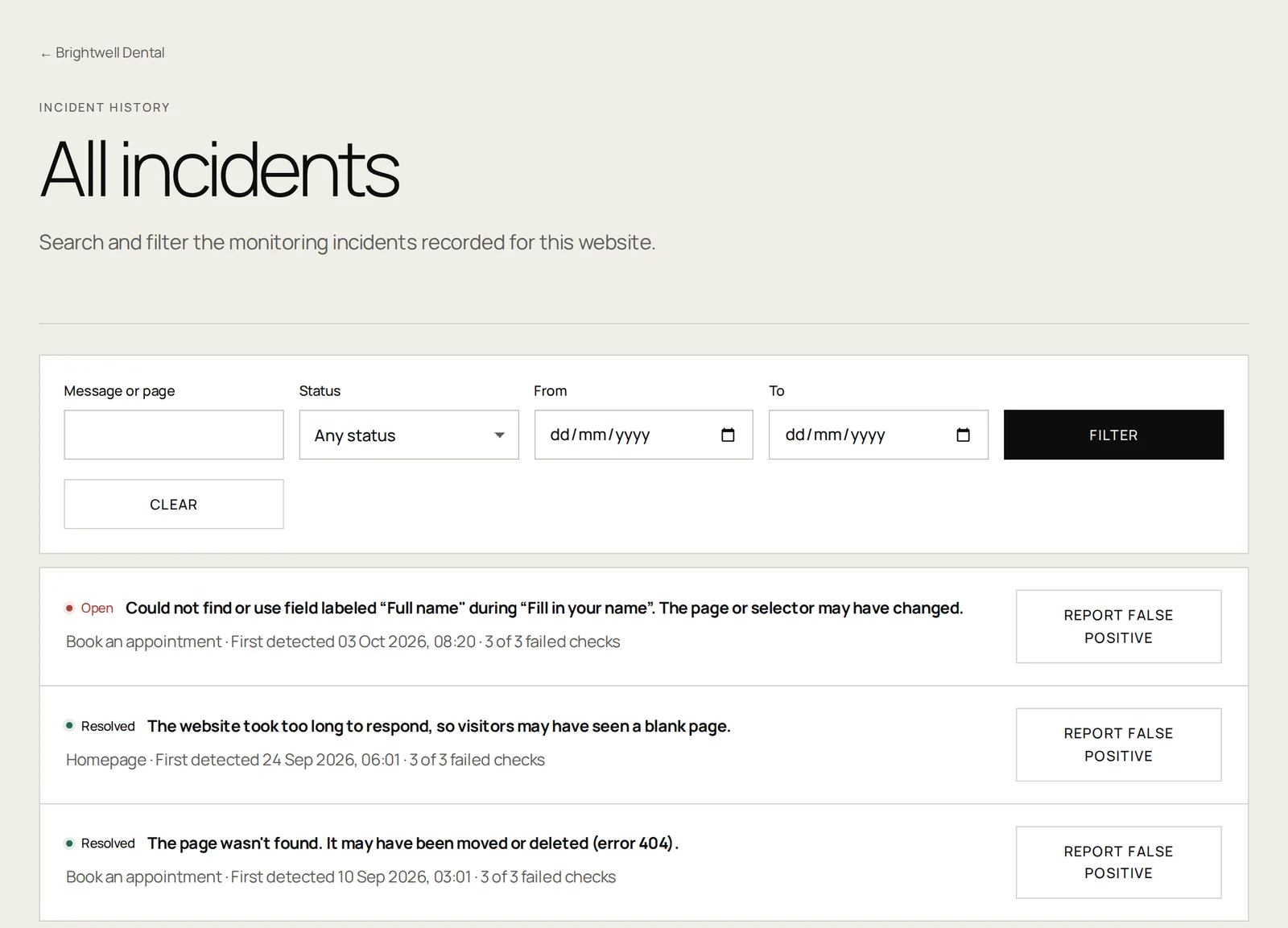
Online versus working
Review check results to see which parts of your website need attention.
[ In practice ]
What an uptime check actually measures.
An uptime check is a request and a verdict. Pulse asks one of your important pages for its content, waits for the server to answer, and records what came back: the status code, how long it took, whether the certificate was valid, and whether the words you told us to expect were present. Every result is kept, so the pattern over weeks is visible rather than only the alert on the day.
That sounds simple because it is. The value is not in the sophistication of the check; it is in the fact that somebody is doing it at all, consistently, and that the result reaches a human being who can act on it in language they understand.
01
Status codes, read properly
A 200 means the server answered. It does not mean the answer was right. Pulse can also require that specific text appears in the response, which is how a page that returns 200 while showing a database error still counts as a failure.
02
Check frequency, stated plainly
Paid plans check important pages roughly every two hours; free monitoring runs twice a day. That is a deliberate choice. Pulse is built for businesses that need to know the booking form broke this morning, not for teams paging an on-call engineer in ninety seconds. If you need sub-minute detection for infrastructure, a dedicated uptime tool will serve you better, and we will say so.
03
Certificates before customers see the warning
An expired SSL certificate replaces your website with a full-page browser warning. It is one of the few failures that is both completely preventable and completely catastrophic for trust. Pulse records the expiry date at every scan and flags it 30 days in advance, and if the certificate does lapse, the failed page check alerts you.
04
Domain expiry, the quiet catastrophe
Domains lapse because a renewal notice went to an inbox nobody reads any more. Pulse records the domain’s expiry date at every scan and flags it 30 days ahead, so the first sign is not a customer asking why your website has been replaced by a parking page.
05
Evidence that survives the incident
Intermittent faults are the hardest to fix because they are gone by the time anyone looks. When a check fails, Pulse keeps the HTML that was returned, so the person fixing it has something to read rather than a description from memory.
06
Confirmation that it recovered
Knowing something broke is half the job. Pulse keeps checking after a failure and tells you when the page is answering properly again, so nobody has to remember to go back and look, and nobody assumes a fix worked when it did not.
Free tools Check it yourself
Test it now,
before you decide anything.
01
Contact form tester
Find out whether your contact form still reaches a human being, and what to check when it does not.
02
Booking system tester
Find out whether a customer could complete a booking on your website today, and where the journey breaks.
No scripts to learn.
Tell us what must
keep working.
Essential: from £14 per website per month. Availability, SSL, domain and expected-content checks, typically about every two hours. You choose the pages and how often they are checked.
What a failed check tells you
For example, a monitored page may stop responding, return an unexpected status, or lose expected content. The check history and available HTML evidence help the person investigating understand what was returned. A successful response does not prove that a form or checkout works.
- Agree which URLs and expected content matter.
- Confirm the check schedule and notification setup before monitoring starts.
- Use browser monitoring where the customer needs to interact with the page.